
Watching an image being displayed on your own mini e-gallery sounds like a lot of fun! Thankfully, this is now made possible by the fantastic combo of a broad colour spectrum ST7789 IPS module and a sufficient memory size of the ESP8266. Take a look at what each has to offer:-
- ST7789 is an IPS display module, 2-inch diagonal, 240×320 resolution, with an embedded ST7789V controller, an in-built 3V3 voltage regulator and supports SPI interfacing. ST7789 can be very conveniently used to draw basic geometric shapes and display coloured text or pictures in portrait/landscape mode.
- ESP8266 has many things to offer. What we are looking for here is its 4 MB Flash, which makes it even more suitable to store data that gets displayed on the ST7789 IPS module, eliminating the need for an external Micro SD Memory Card.
You can use a NodeMCU interfaced with RFID Reader to explore another ESP8266-based project. →
NodeMCU interfaced with RFID Reader
The basic working principle is that an IPS display is capable of displaying a wide range of colours with a full angle view (lossless colour or brightness front screen view/side screen view). Our chosen display, i.e. ST7789 IPS module, comes with 65k colours and default backlighting.
ESP8266 sends 16-bit RGB565 format data via its MOSI pin to ST7789 every 2 clock cycles. This data contains a 5-bit red value, followed by a 6-bit green value, followed by a 5-bit blue value of a single pixel to be displayed. After the successful reception of data, the embedded ST7789V controller of ST7789 refers to its 65k colours look-up table and maps each pixel on the display in order to re-create the desired geometric shape/text/image on the ST7789 IPS module.
Furthermore, the TFT eSPI library, which is Arduino IDE/ESP8266/ST7789V compatible, is utilised in programming to enhance the speed and reduce lag in the display.
Our aim of this DIY E-Project is to display images in portrait mode, followed by a text indicating the type of each image, namely calligraphy, animated and an HD photo on the ST7789 IPS module. Take a look at the images which have been selected to be displayed:-
Image type: Calligraphy | Image type: Animated | Image type: HD Photo |
 |  |  |
E-COMPONENTS
Here is a list of all the required electronic components for this DIY E-Project, along with respective purchase links:-
MODEL | E-COMPONENT | PURCHASE LINK |

| NodeMCU ESP8266 | |

| ST7789 LCD Colour Display Module | |

| USB data cable | |

| Power bank |
CIRCUIT DIAGRAM

SCHEMATIC DIAGRAM

Add colourful visual effects with a Bluetooth WS2812B RGB ring light. →
Colour changing Bluetooth WS2812B RGB ring light
PROCEDURE
These are some of the step-by-step guidelines to be followed for this DIY E-Project:
- Install the latest Arduino IDE.
- Install the ESP8266 library in the Arduino IDE.
- Download the modified TFT_eSPI library .ZIP file from here →TFT_eSPI (Note: Kindly download the TFT_eSPI library from here itself as its User_Setup.h file has been updated to get assured results as per this DIY E-Project. Else, you can download the TFT_eSPI library .ZIP file from the link https://github.com/maditnerd/st7789_bitmap and make your modifications manually.)
- In Arduino IDE, go to Sketch→Include Library→Add .ZIP Library and install the modified TFT_eSPI library in Arduino IDE.
- Make hardware connections as per the above circuit and schematic diagrams.
- Connect the ESP8266 to your Laptop/PC via USB data cable. In Arduino IDE, go to Tools and select Board as NodeMCU 1.0 (ESP-12E Module) and COM port accordingly.
- Download the folder containing the sketch and images header files from here → Display_images_on_ST7789_IPS_module_sketch . Make sure to save all the image header files in the same folder as your sketch. (Note: kindly download the folder from here itself to get assured results as per this DIY E-Project. Else, follow the instructions as mentioned in the link https://www.hackster.io/usini/display-images-on-a-st7789-screen-fbb0d7 .)
- Upload the “Displaying Images on ST7789 IPS module sketch” from the programming section below to NodeMCU.
- Optionally, after the completion of the program upload, you can plug off the USB data cable connected from the ESP8266 to the Laptop/PC and again connect it from the ESP8266 to a Power bank.
Explore LED matrix displays through a Word Clock using MAX7219 LED Dot Matrix Display. →
Word Clock using MAX7219 LED Dot Matrix Display
PROGRAMMING
SKETCH 1: Displaying Images on ST7789 IPS module sketch
/*
 *Display images on ST7789 IPS module
 *Made by www.wiztaqnia.com
 *Modified date: 29/09/2022
 *Typical pin layout used:
 * ---------------------------------------------
 * Signal               ST7789 IPS    ESP8266
 *                      Module        Interface
 *                      Pin           Pin
 * ---------------------------------------------
 * VCC(3.3V)            VCC           3V3
 * GND(Ground)          GND           GND
 * SDA(Serial Data)     DIN           D7(MOSI)
 * SLK(Serial Clock)    CLK           D5(SCLK)
 * CS(Chip Select)      CS            D8(CS)
 * DC(Data/Command)     DC            D0
 * RST(Reset)           RST           D1
 * BL(Backlight)        BL            D2
  */

#include <TFT_eSPI.h>
#include "Not_all_heros_wear_capes_lettering.h" //Image 1
#include "Metaverse.h"                          //Image 2
#include "Flower_pot_with_flowers.h"            //Image 3
TFT_eSPI ipsdisp= TFT_eSPI();

void setup() {
 Serial.begin(115200);        //Initialise UART Communication with 115200 bits/s Baud Rate
 ipsdisp.begin();             //Initialise SPI Bus
 ipsdisp.init();              //Initialise ST7789
 ipsdisp.setRotation(2);      //Value 1 means landscape mode; Value 2 means portrait mode
 ipsdisp.setSwapBytes(true);  //Swap the byte order for pushImage() - corrects endianness
 ipsdisp.fillScreen(TFT_WHITE);
}

void loop() {
 ipsdisp.pushImage(0,0,240,320,image1);    //ipsdisp.pushImage(x1,y1,x2,y2,array of image 1 containing 16-bit RGB565 data of each pixel)
 ipsdisp.setCursor(0,295,4);               //ipsdisp.setCurser(x axis,y axis,text font style i.e. 1/2/4/6)
 ipsdisp.setTextColor(TFT_CYAN,TFT_BLACK); //ipsdisp.setTextColor(text color,text background color)
 ipsdisp.println(F("IMG TYP:Calligraphy  "));
 delay(10000);
 ipsdisp.pushImage(0,0,240,320,image2);    //ipsdisp.pushImage(x1,y1,x2,y2,array of image 2 containing 16-bit RGB565 data of each pixel)
 ipsdisp.setCursor(0, 295,4);              //ipsdisp.setCurser(x axis,y axis,text font style i.e. 1/2/4/6)
 ipsdisp.setTextColor(TFT_CYAN,TFT_BLACK); //ipsdisp.setTextColor(text color,text background color)
 ipsdisp.println(F("IMG TYP:Animated     "));
 delay(10000);
 ipsdisp.pushImage(0,0,240,320,image3);    //ipsdisp.pushImage(x1,y1,x2,y2,array of image 3 containing 16-bit RGB565 data of each pixel)
 ipsdisp.setCursor(0,295,4);               //ipsdisp.setCurser(x axis,y axis,text font style i.e. 1/2/4/6)
 ipsdisp.setTextColor(TFT_CYAN,TFT_BLACK); //ipsdisp.setTextColor(text color,text background color)
 ipsdisp.println(F("IMG TYP:HD Photo     "));
 delay(10000);
}
OUTPUT
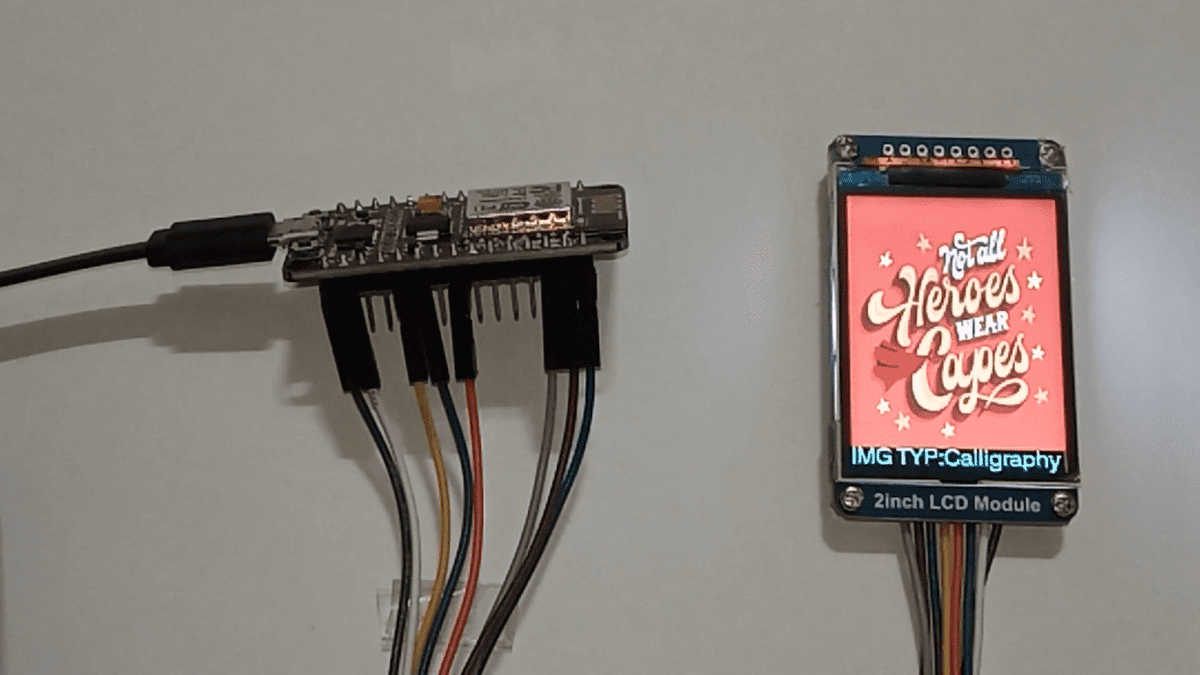
View the complete source code on GitHub→ Homebrew Electronics/Displaying images on ST7789 IPS module interfaced with ESP8266
This post was inspired by https://www.hackster.io/usini/display-images-on-a-st7789-screen-fbb0d7
References:
- https://www.waveshare.com/wiki/2inch_LCD_Module
- https://github.com/Bodmer/TFT_eSPI
- https://ifixscreens.com/amoled-vs-ips-lcd-does-display-technology-matter/
- https://arduino.stackexchange.com/questions/24648/how-to-determine-flash-size

Noor Fatimah Iqbal Husain is the visionary behind Wiztaqnia. As a hardware engineer passionate about hands-on learning, she simplifies complex electronics and technology through engaging content. When not writing or working with circuits, she explores emerging technologies and their real-world benefits. Connect with her to deepen your understanding of technology and electronics.